When building a continuous water balance model in platforms like GoldSim, you know that the simulation often hinges on the quality of your meteorological inputs. Water balance models are often sensitive to drivers such as daily precipitation, evaporation, and temperature.
Sourcing historical climate data can be tedious. Locating a station with an adequately complete data record, downloading the raw archives, converting units, and formatting the arrays so they import correctly into your model usually requires a lot of manual spreadsheet formatting.
To eliminate this friction, I've developed the Historical Daily Climate Time-Series Downloader—available now in my Engineering Toolbox.
How It Works
-
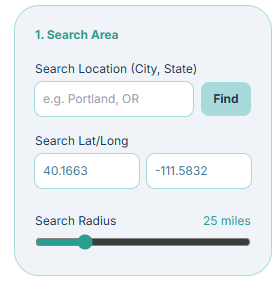
Locate your Site: Type in your target city, latitude/longitude coordinates, or use your mouse to pan and zoom to your project location and set a search radius.
-
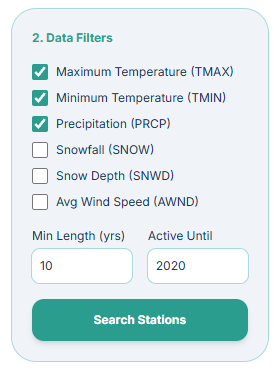
Choose the data you want to include and specify the minimum length in years it covers along with how recent the monitoring has been active.
-
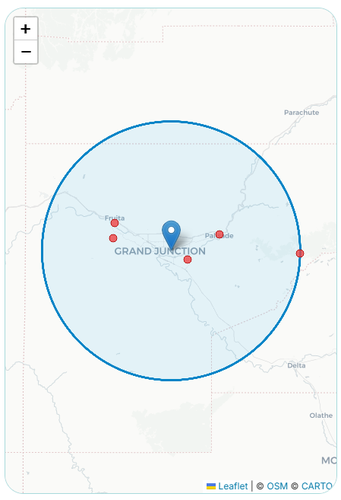
Search Stations: The tool queries an up-to-date file containing all the station data in the GHCN database and returns a mapped list of every available climate station within your radius. You'll see their elevation, distance from your target, and how many years of continuous data they have.
-
Export: Select your preferred units (Metric or US Customary) and the tool will bundle your data into a
.zipfile containing two distinct CSVs: a model-ready time series and a raw data file as you would see when downloading directly from the GHCN database.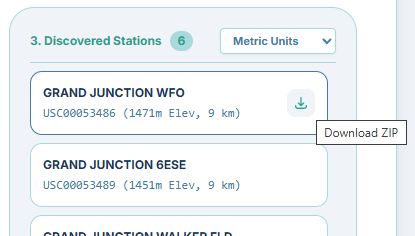
What's Happening Behind The Scenes?
The underlying data is sourced from NOAA's Global Historical Climatology Network (GHCN-D). While this dataset is the standard for global climate records, the native format is raw and requires processing before it can be reliably used in a simulation.
To bridge that gap, the tool handles the following:
- Completeness Filtering: During your search, it scans the inventory to find stations based on exactly how many years you need the data to cover, ensuring the active data extends at least up until the year you specify.
- Unit Conversion & Date Formatting: During extraction, it converts the raw values into your chosen Metric or US Customary units and properly formats the date column.
- Handling Missing Data: Because platforms like GoldSim do not allow blank cells, the tool isolates any missing daily records in the timeline and cleanly replaces them with a
-999numeric placeholder. - Metadata Preservation: NOAA attaches character flags (Measurement, Quality, and Source codes) to their records. Rather than discarding this metadata or mixing it into our numeric columns, the tool extracts it into a separate audit file.
When you hit download, you end up with a ZIP archive containing two prepared files:
1. [station]_model_ready.csv: A numeric time series explicitly formatted for immediate copy-pasting into your Time Series elements in GoldSim or other water balance modeling platforms.
2. [station]_audit_log.csv: An expanded time series containing all the raw NOAA metadata flags preserved in adjacent columns, just in case you ever need to evaluate the quality assurance lineage of the record.
Try It Out
Head over to the Engineering Toolbox to try the tool and start speeding up your hydrological workflows!