Data & Results
The Data Menu
While the Map and Properties Panel are excellent for configuring individual elements, large hydraulic networks require bulk review. The Data Menu provides an Excel-like tabular interface for reviewing your entire system at a glance.
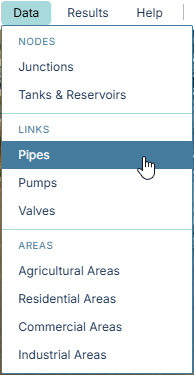
Located in the top menu bar, the Data dropdown allows you to open comprehensive tables separated into three main categories: Nodes, Links, and Areas.
These tables are strictly Read-Only summaries designed to prevent accidental bulk overwrites. However, they are deeply integrated with the map: If you click on any row in the table, the modal will close, the map will automatically fly to that specific element, and its Properties Panel will open so you can edit it!
Node Tables
- Junctions: Displays the ID, Name, Elevation, Base Demand (if manually forced), and the name of the Land Area it is assigned to deliver water to.
- Tanks & Reservoirs: Displays the ID, Name, Type, Elevation, and the physical Tank Geometry parameters (Initial Level, Min/Max Level, and Diameter).
Link Tables
- Pipes: Displays the ID, Calculated Length, Diameter, Roughness Coefficient, and the Start/End connecting nodes. This is incredibly useful for Quality Assurance—by scanning the Diameter column, you can quickly identify if you accidentally left a main transmission line set to a default 6-inch diameter instead of 24 inches.
- Pumps: Displays the Pump Curve Type (Single vs 3-Point) and its corresponding Design Flow and Design Head parameters.
- Valves: Displays the Valve Type (PRV vs PSV), its Diameter, and the Target Pressure setting.
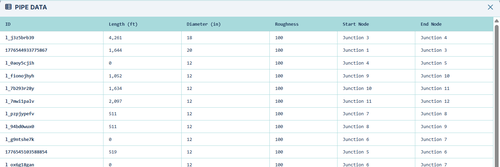
Area Tables
- Agricultural Areas: Displays the physical Area (in acres), assigned Crop, assigned Irrigation Method, and the GIS-evaluated Soils beneath the field.
- Residential Areas: Displays the Area (acres), the specific Density Category, and the total Quantity of housing Units/Homes.
- Commercial Areas: Displays the Area, Category, assigned baseline Indoor Demand (gpm), and the specific Lawn Size (acres) assigned to the parcel for outdoor sprinkling.
- Industrial Areas: Displays the Area, Category, and the fixed baseline Demand (gpm).