Crops Library
The Crops Library is the agronomic brain of your IAMDD project. The parameters defined here dictate exactly how much water your fields need (Evapotranspiration demand) and exactly when they will turn their irrigation systems ON to get it.
Automatic Population via USDA
You usually do not need to build this library from scratch! When you initialize a new project, IAMDD automatically queries the USDA National Agricultural Statistics Service (NASS) Cropland Data Layer based on your map's exact geographic coordinates. It pre-populates your library with the actual crops statistically grown in your specific region.
- If you ever need to refresh this data manually, click the "Sync with USDA CDL" button in the top right corner of the Manage Crops modal.
Working with Crop Parameters
To edit or add crops, open the Library Menu and select Crops.
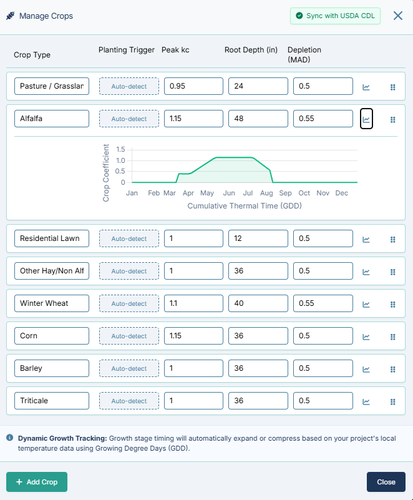
For each crop, you can edit the following critical engineering variables:
- Peak kc (Crop Coefficient): This scalar value drives the daily mass-balance equation. The higher the
kc, the more water the crop transpires relative to the baseline reference evapotranspiration (ETo). - Root Depth (in): This defines the physical size of the soil's "gas tank." A crop with a 48-inch root depth (like Alfalfa) has access to a massive reservoir of stored soil moisture and can go days without watering. A crop with a 12-inch root depth (like Lawn) has a tiny reservoir and will need frequent, shallow watering.
- Depletion / MAD (Management Allowed Depletion): This is the trigger threshold. A MAD of
0.5means the field is allowed to consume exactly 50% of its available soil water before the engine forces the irrigation system to turn ON.
Dynamic Growth Tracking (GDD)
If you click the Chart Icon next to any crop, you will see its growth curve.
Instead of using rigid calendar dates (which are inaccurate across different climates), IAMDD uses Growing Degree Days (GDD). The simulation engine reads the live historical temperature data for your specific location and dynamically expands or compresses the crop's growth stages based on the thermal heat accumulated. This ensures your simulated water demand accurately matches the real-world physiological stress of the plant.
Applying a Crop to a Field
Once your library is configured:
- Click on any Agricultural Area (polygon) on your map.
- In the Properties Panel, locate the Crop Type dropdown.
- Select the desired crop from your library. The field will immediately inherit the Root Depth, MAD, and Kc parameters you defined.