Energy Rate Settings
IAMDD automatically calculates the electrical operating costs for your entire network based on the dynamic hydraulic conditions of your pumps. You can access these settings by clicking Settings > Energy Rates in the top navigation bar.
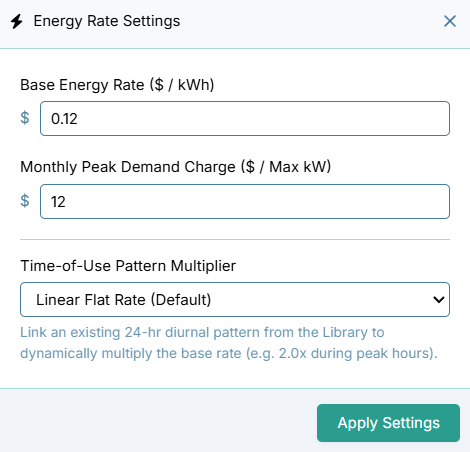
1. Base Energy Rate ($ / kWh)
This is the flat volumetric rate charged by your utility provider for electrical consumption. * How it works in the model: At every 1-hour time step, the engine calculates the physical work being done by every pump in your system based on its actual flow rate (GPM) and its Total Dynamic Head (TDH). It converts this Water Horsepower into Kilowatts (assuming a standard 75% wire-to-water efficiency rating) and multiplies it by this base rate.
2. Time-of-Use Pattern Multiplier
Many modern electrical grids utilize "Time-of-Use" (TOU) pricing, where electricity is significantly more expensive during peak daylight hours.
* How it works in the model: You can assign any 24-hour diurnal pattern from your Project Library to act as a dynamic price multiplier. For example, if your base rate is $0.12, but you apply a pattern that spikes to 2.0 between 4:00 PM and 8:00 PM, the engine will automatically charge you $0.24/kWh for any water pumped during that peak window. (If no pattern is selected, a linear flat-rate multiplier of 1.0 is used).
3. Monthly Peak Demand Charge ($ / Max kW)
In commercial and agricultural power accounts, utilities often charge a steep penalty based on your maximum instantaneous power draw, regardless of your total volumetric consumption. * How it works in the model: The engine continuously scans the simulation results to find the single highest 1-hour kilowatt (kW) draw for each calendar month. It multiplies that peak kW value by this demand charge rate, and adds it to your total electrical bill as a monthly lump-sum penalty.