Municipal Area Demands
IAMDD uses polygon "Areas" to represent geographic regions of water demand (such as neighborhoods, commercial lots, parks, or industrial complexes).
Once an area is drawn on the map, IAMDD will automatically calculate its exact physical acreage. Simultaneously, it performs a live GIS evaluation (using USDA NRCS SSURGO data) to determine the exact Soil Composition beneath that polygon. However, to calculate the actual water demand, you must assign it a specific land use type.
Defining Municipal Properties
Click on your drawn shape to open the Area Properties panel. Ensure the top toggle is set to Municipal (rather than Agricultural).
Depending on the specific Land Use Category you select from your Library, the engine requires different information to calculate the total flow.
Residential Zones
Because residential demand scales strictly with population density, the physical size of the polygon you drew actually does not matter to the hydraulic engine. Instead, it relies on the number of dwellings inside that polygon.
When you finish drawing a Residential area, IAMDD automatically queries the OpenStreetMap (OSM) Overpass API to scan for building footprints and unit tags within your exact polygon coordinates. How this data is presented in the properties dialog depends on how you defined the assigned Land Use Category in the Library:
-
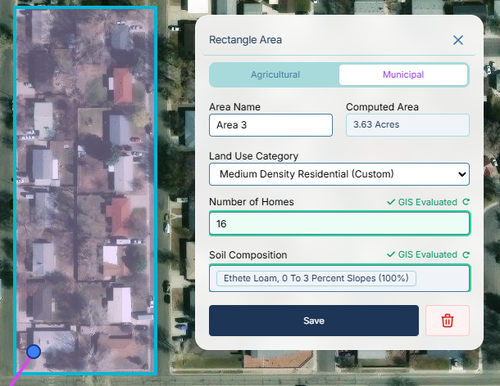
Single-Family Categories: For standard residential zones (where the "Multi-Family" box is unchecked in your library), the dialog displays a single Number of Homes field. This represents the total number of houses inside the polygon. The engine multiplies this number by the Indoor Demand (gpm/U) and Lawn Size (Ac/U) parameters to calculate total neighborhood demand.
-
Multi-Family Categories: For categories flagged as Multi-Family in your library (e.g., apartment complexes or dense townhomes), the dialog adapts to a structural calculation. OSM often only identifies the exterior footprint of large buildings rather than individual apartments. The interface will display:
- Number of Structures: The physical building count estimated by the GIS scanner.
- Units per Structure: A multiplier field allowing you to define the average density per building (e.g., 20 units per structure).
- Total Units: A read-only field that automatically calculates the final unit count sent to the hydraulic engine.
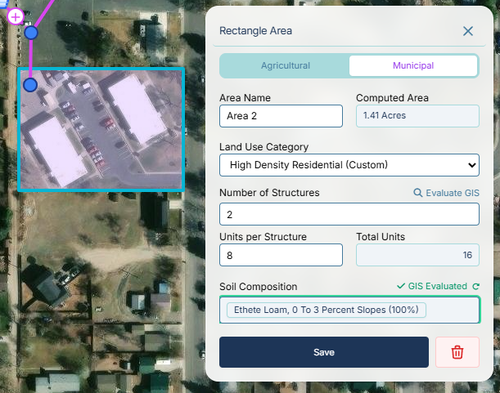
(Note: While IAMDD auto-estimates structure and home counts using GIS, you can manually click into these input boxes and override the values if you have better local survey data).
Commercial & Mixed-Use Zones
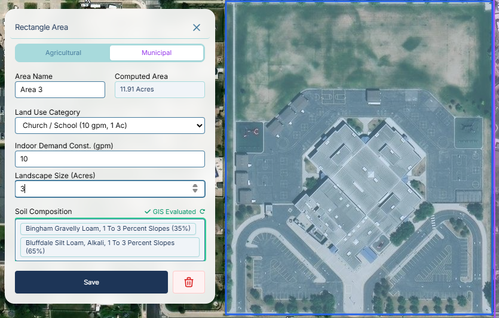
Commercial parcels (like strip malls, churches, or schools) are treated as bulk consumers.
- Indoor Demand Const. (gpm): The total baseline indoor flow required for the buildings.
- Landscape Size (Acres): Unlike residential zones, commercial zones require you to explicitly state how much of the parcel is irrigable landscaping versus pavement/parking lots. The engine will treat this acreage exactly like a residential lawn, tracking soil moisture and applying sprinkler demand when the soil dries out.
Industrial Zones
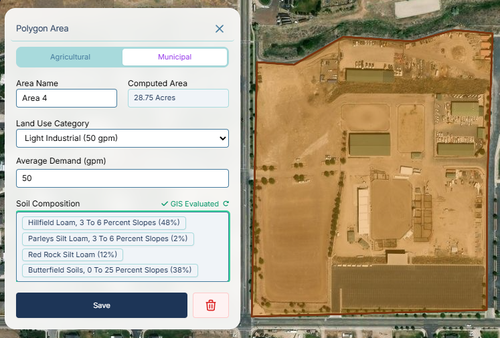
Industrial areas are modeled as pure hydraulic consumers, as their water use is dominated by manufacturing processes or cooling systems rather than weather-dependent landscaping.
- Average Demand (gpm): A fixed baseline flow rate. The engine applies the assigned diurnal multiplier pattern to this value hour-by-hour, completely ignoring live weather or soil moisture data.
Conservation & Outdoor Schedules
To help evaluate the impact of local conservation ordinances on your network's peak daily demand, IAMDD allows you to restrict outdoor sprinkling events to specific days.
At the bottom of the Municipal Area Properties panel, you will find the Outdoor Watering Schedule dropdown. This setting applies strictly to the outdoor (landscape) demand component of Residential and Commercial zones.
- Everyday: The default setting. Outdoor irrigation occurs automatically whenever the soil moisture depletes below the allowable threshold.
- Odd/Even Days Only: Restricts the engine from applying outdoor water unless the calendar day of the simulation matches the schedule.
- Day-of-Week Rotations: (e.g., Mon/Wed/Fri). Restricts the engine to only irrigate on the selected days of the week.
If the area's soil dries out on a restricted day, the hydraulic engine forces the outdoor flow to zero, simulating an imposed delay. Importantly, the engine continues to calculate and deliver the indoor base flows without interruption on restricted days, allowing you to accurately isolate and simulate the hydraulic impact of outdoor watering restrictions.