Visual Settings
Visual Settings
When running complex hydraulic simulations with thousands of data points, it becomes impossible to manually click on every individual node and pipe to check its status. To make analyzing large networks easier, IAMDD allows you to customize the color-coding of the map interface based on specific performance thresholds. To access these configurations, click Settings > Visual Settings in the top navigation bar. When the simulation slider moves, the map will automatically update the colors of your network components to alert you to problems based on these rules:
- Node Pressure (PSI): Quickly identify locations with insufficient head.
- Red: Pressure ≤ 5 psi (Critical Failure)
- Yellow: Pressure ≤ 30 psi (Warning)
- Green: Pressure ≤ 50 psi (Optimal)
- Blue: Pressure > 50 psi (High Pressure)
- Link Peak Velocity (ft/s): High velocities cause friction losses, water hammer, and pipe wear. Low velocities can cause sediment buildup.
- Blue: Velocity < 1 ft/s (Sluggish)
- Green: Velocity < 3 ft/s (Optimal)
- Orange: Velocity < 5 ft/s (Warning)
- Red: Velocity ≥ 5 ft/s (High Friction/Erosion Risk)
- Area Minimum Soil Moisture (in): Monitor crop health at a glance.
- Wilting Threshold (e.g., ≤ 4.73 in): You can define the permanent wilting point for your fields.
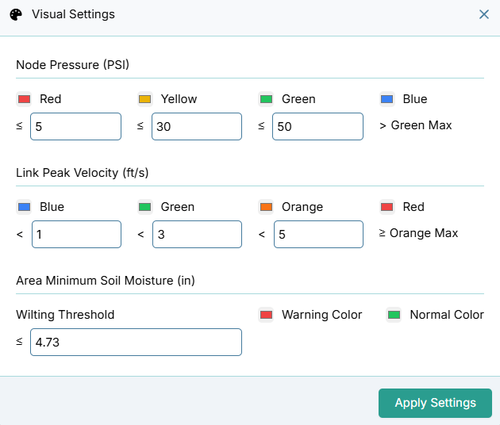
By tweaking these thresholds, you can tailor the visual alerts to match the specific design criteria of your project (for example, if your drip emitters require a strict minimum of 35 psi instead of 30).
Built-In Area Alerts
In addition to the sliding color scales for pipes and nodes, IAMDD has two hard-coded visual alerts for your geographic zones to ensure critical failures are never missed:
- Agricultural Stress: If a field's soil moisture balance drops below your defined Wilting Threshold at any point during the simulation, the entire field polygon will turn Red.
- Municipal Supply Failure: If the pressure at a municipal zone's delivery node drops below 20.0 psi (the standard regulatory minimum pressure for residential supply) at any point during the simulation, the municipal polygon will turn Red.