Network Elements and Properties
Hydraulic Links
Links represent the physical conveyances that move water between nodes. By clicking on any line drawn on the map, you can define its engineering properties in the panel on the right.
There are three types of links available in IAMDD, which can be toggled via the Link Type dropdown:
1. Pipes
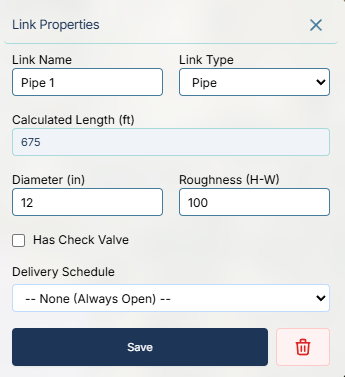
Pipes are the standard, default link type. When you trace a line between two nodes, it is automatically categorized as a pipe.
- Calculated Length (ft): The physical length of the pipe is automatically calculated by the GIS engine based on your drawing. However, you can manually override this value if the true pipe length differs from the map distance (e.g., if there are vertical drops not visible from the aerial view).
- Diameter & Roughness: You must specify the internal diameter (in inches) and a roughness coefficient (e.g., Hazen-Williams 'C' factor) for the engine to accurately calculate friction losses.
- Has Check Valve: Checking this box inserts a physical constraint that strictly prevents reverse flow through the pipe.
- Delivery Schedule: If this pipe acts as a headgate or turnout for an agricultural field, you can assign it a rotational delivery schedule (configured in your Library) to dictate exactly when the valve opens and closes.
2. Pumps
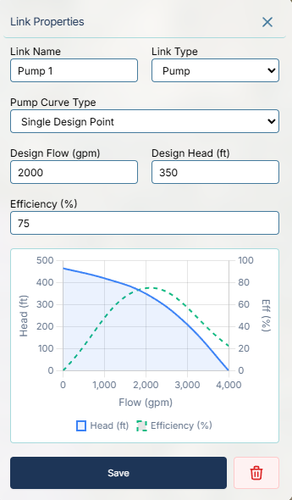
Pumps add energy to the water, allowing you to force water uphill or artificially pressurize a network.
- Pump Curve: Real-world pumps don't deliver a constant flow; their output depends on the pressure they are pushing against. IAMDD allows you to define this relationship using either a Single Design Point (where the engine automatically generates a standard curve based on your Design Flow and Design Head) or a custom 3-Point Curve for precise calibration.
- Efficiency (%): You must provide the pump's wire-to-water efficiency. The engine uses this value, along with the hydraulic results, to calculate your hourly kW power draw.
- Energy Analysis: When combined with your global Energy Rates settings, these efficiency calculations allow IAMDD to determine the exact financial cost of running your system.
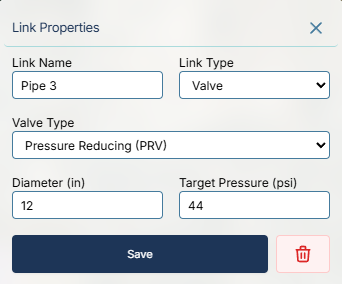
3. Valves
Valves allow you to artificially regulate flow or pressure across specific points in your network.
- Pressure Reducing Valve (PRV): Throttles flow to ensure the pressure downstream of the valve never exceeds your specific Target Pressure (psi). This is incredibly useful for protecting sensitive irrigation equipment (like drip tape) located at the bottom of a steep hill.
- Pressure Sustaining Valve (PSV): Throttles flow to ensure the pressure upstream of the valve never drops below your Target Pressure (psi). This is useful for ensuring a mainline doesn't depressurize when a massive lateral turnout opens.