The Library Menu (Global Data)
Patterns Library
Water demand and energy costs are rarely constant. The Patterns Library allows you to define exactly how variables fluctuate over a standard 24-hour cycle.
Diurnal Multipliers
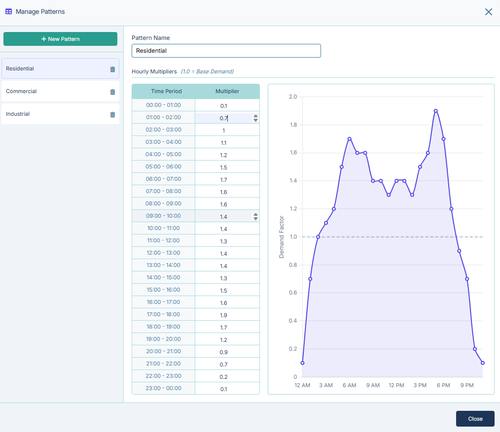
A diurnal pattern is a 24-hour multiplier curve.
- A multiplier of
1.0represents the baseline average. - A multiplier of
1.5means the value is 50% higher than the baseline at that specific hour. - A multiplier of
0.5means the value drops to half of the baseline.
By default, IAMDD provides standard morning and evening peak curves for Residential, Commercial, and Industrial profiles, but you can create custom patterns for specific facilities (like a factory that operates only on a night shift).
Managing Patterns
- Open the Library Menu and select Patterns.
- Click + New Pattern to create a blank 24-hour curve, or select an existing pattern from the sidebar to edit it.
- Type directly into the Hourly Multipliers table on the left to set the value for each hour of the day.
- The interactive chart on the right will dynamically update, allowing you to visually verify the shape of your peak demand curve.
Where Patterns are Used
Once a pattern is saved in your library, it can be dynamically linked to three different drivers in your simulation:
- Municipal Areas: Link a pattern to a municipal zone (e.g., Residential) to simulate peak morning showers and evening cooking demands.
- Energy Rates: Link a pattern in the Energy Rate Settings to act as a Time-of-Use (TOU) cost multiplier, simulating expensive electricity during peak grid hours.
- Flow Boundaries: Link a pattern to a Flow Boundary node to simulate a predictable, repeating 24-hour pump cycle or industrial discharge.