Tank Geometries
For the hydraulic engine to accurately calculate the pressure generated by a storage tank, it must continuously track the exact elevation of the water surface. As water drains out, the pressure drops. To calculate this drop accurately, the engine must understand the physical dimensions of that tank or pond.
Depth vs. Volume Curves
Because storage facilities come in all shapes and sizes (e.g., spherical water towers, horizontal cylindrical tanks, sloped excavated ponds), IAMDD allows you to define complex shapes using a Depth vs. Volume table.
- Open the Library Menu in the top navigation bar and select Tank Geometries.
- Click the + New Curve button on the left sidebar to create a blank curve.
- Give your curve a recognizable name (e.g., "Pond A" or "10k Gal Sphere").
- Click + Add Point to build your table. You must input the cumulative volume of water (in cubic feet, ft³) the tank holds at various depth increments (in feet, ft).
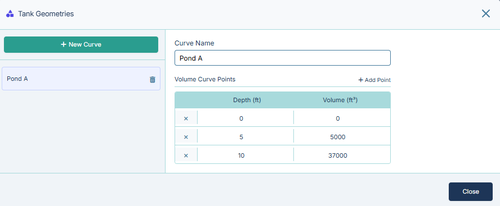
During the simulation, the hydraulic engine will dynamically interpolate between these points to calculate the exact water surface elevation as the tank fills and drains.
Applying a Geometry to a Tank
Once a geometry curve is saved in your library, it is available for use anywhere on your map:
- Click on any Tank node to open its Properties Panel.
- In the Tank Shape dropdown, select Library Curve.
- A secondary dropdown will appear. Select your newly created curve (e.g., "Pond A").