File & Map Navigation
The Layers Menu
IAMDD integrates directly with industry-leading global GIS providers to give you high-resolution geographic context.
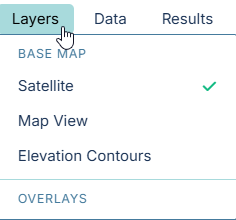
Use the Layers dropdown in the top navigation bar to switch between different base maps at any time during your modeling process:
Base Map Options
- Satellite (Default):
Provides high-resolution, global aerial imagery. This is the most useful layer for identifying existing agricultural fields, tracing municipal boundaries, and locating physical infrastructure like pump stations or headgates.
- Data Provider: Esri World Imagery (combining data from Maxar/GeoEye, Earthstar Geographics, USDA, and USGS).
- Map View:
Standard vector mapping showing roads, highways, property boundaries, and municipal layouts. This layer is highly optimized for readability and is particularly useful when designing urban or residential distribution networks where you need clearly defined street names and lot lines.
- Data Provider: CARTO Voyager (built on top of open-source data from OpenStreetMap contributors).
- Elevation Contours:
Displays detailed terrain elevation contours, natural hydrographic features, and shading. This layer is absolutely critical when routing pipes across hilly or mountainous landscapes, analyzing gravity-fed delivery potential, or roughly estimating pump head requirements before running a detailed hydraulic simulation.
- Data Provider: The U.S. Geological Survey (USGS) National Map.
Overlays
(Coming Soon) Additional data overlays, such as live weather radar or soil type heatmaps, will be accessible here.